
There are three phases to a tender, which are unlimited and determined by the builder:
- Sales Quote
- Preliminary Contract
- Final Contract
Moving between phases - the pervious phase must be recorded and the client must have the ability to view previous phases of a tender.
Once the Final Contract phase is reached all alternative Tenders of the customer must be made inactive.
The Client must have the ability to skip phases.
The Tender must have a status, the status is linked to the phase.
Status changes must be able to be accompanied with reason codes and comments.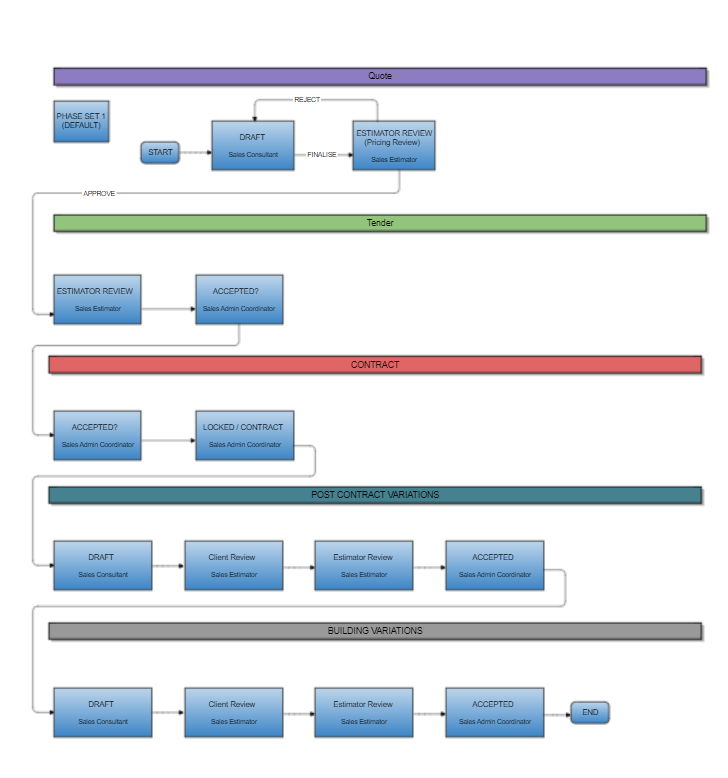
Tender Stages
- Draft
- The Sale Representative is creating the quote
- Estimator Review
- The Estimator is reviewing the tender
- Accepted
- The Client is reviewing the contract
- Contract
- Final Contract is signed off
Scenario :
The process starts with interest from a client to build a house.
The sales representative creates a quote which is presented to the client.
After they review the quote there are several pre-contract variations made before a final contract is created.
A Tender presenter or Prestart consultant as well as an Estimator may be involved in this process.
The final contract may then have several post-contract variations as well as an Addenda for the colours selection process.
Tender Roles & Documentation Output
Roles potentially involved in the tendering process;
- Client;
- Sales Representative;
- Tender Presenter / Prestart Consultant;
- Estimator;
- Colours Selector.
Documentation output from a Tender;
- Sales Quote
- Pre-Contract Variations
- Final Contract
- Post-Contract Variations
- Addenda
Tender Phases
The creation of a concept called Tenders Phases and phase sets led to an improvement in the flexibility of the tenders workflow.
These can be used to configure a customised workflow for the various types of stages (phases) in your workflow.
Example:
- Sales Quote
- Variations
- Contract
- Selections
- Post Contract Variations
- Building Variations
- etc.
Each phase belongs to a single Phase set. The Phase set helps sequence Phases in the same way a Template groups Template items. The workflow is much more simple, each phase indicates what the direct next phase is. Overall, the order of the phases is expressed in the custom order field. The last phase will have a null entry for the Next Phase.
Movement to the next phase is controlled by a field MoveNextOnStatus. If the Tender status changes to this value, move to the next Phase.
The Phase determines the starting status of the tender when it is created in this phase.
Tenders Statuses
There are 3 status fields;
inTenderStatus
| 0 | Draft |
| 1 | Client Review |
| 2 | Estimator Review |
| 3 | Edit Required |
| 4 | Accepted |
| 5 | Locked |
| 6 | Contract |
| 7 | Client Approved |
| 10 | Rejected by the CLient |
| 11 | Rejected by the Builder |
| 12 | Expired |
| 13 | Rejected Alternative |
| 15 | Superceded |
inClientApprovalStatus
| 0 | Pending |
| 1 | Locked |
| 2 | Approved |
inEstimatorStatus
| 0 | Pending |
| 1 | Pricing Required |
| 2 | Locked |
| 3 | Approved |
| 10 | Rejected |
*For Variation statuses see: Info - Tender Variations & Variation Statuses